GCDisplay 2.04r1 - a RIFT addon, maintained again
GCDDisplay is a small RIFT addon that draws a bar for your global cooldown after every ability, so you can time the next press instead of mashing. The original was written by Ade back in 2013 and hosted on riftui.com, where it still sits — untouched since.
I’ve been maintaining a fork for a while, and 2.04r1 is the first release worth pointing people at.
What’s in 2.04r1
- Settings window (
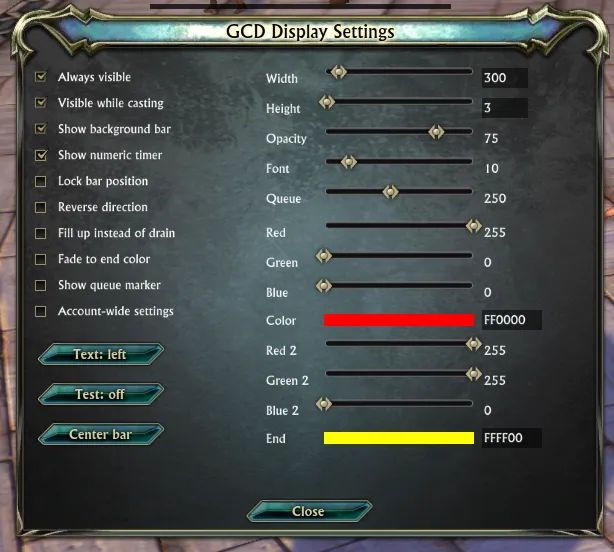
/gcd) — every option in a two-column GUI, no slash commands required. Hex color inputs with live preview included. - Test mode (
/gcd test) — a repeating sweep so you can position and style the bar without being in combat. - Queue marker (
/gcd queue) — a tick on the bar showing the point where your next ability can be queued, adjustable 50–500 ms. - Direction and fill modes — left-to-right or reversed, drain or fill.
- Color fade — the spark can fade towards a second color as the GCD ends.
- The rest — background opacity, timer font size and position, `/gcd reset` with screen clamping, and optional account-wide settings (bar position stays per character).
Every option is also available as a slash command; the full list is in the README.
Download
Grab GCDDisplay-2.04r1.zip from the release page and extract it into RIFT Game/Interface/AddOnsso that GCDDisplay/ sits directly inside AddOns. Enable it on the character select screen, /gcd to configure.
The repository is a trimmed fork of bctrainers’ addon collection — credit for the original addon goes to Adelea; I’m just keeping it alive. Bugs and feedback: repo issues or the usual channels.
That’s the diff.